Free CV Creator Online – Build a Professional CV in Minutes
Create a professional CV online in minutes using free tools with ATS-friendly templates, easy editing, and instant download options.
Overview
Use a free CV creator online to build a professional, ATS-optimized CV in minutes. Choose templates, customize content, and download instantly without design skills. Perfect for fresh graduates and professionals aiming to improve job opportunities.
Everything you need to know about using a free online CV builder to land more interviews no design skills required.
Whether you are a fresh graduate stepping into the job market for the first time or a seasoned professional eyeing a career pivot, your CV is your first impression. The good news? You no longer need to hire a designer or wrestle with complicated word-processing software. A free CV creator online puts a polished, recruiter-ready document in your hands in a matter of minutes. This guide walks you through everything from choosing the right CV creator to formatting tips that get you shortlisted.
Key Points
- Build a CV online in minutes without design skills
- ATS-optimized templates improve job selection chances
- Easy customization with guided content suggestions
- Multiple download formats (PDF, Word) available
- Ideal for graduates, professionals, and career changers
- No software installation required
- Real-time preview for perfect formatting
- Helps increase interview opportunities
What Is a Free CV Creator Online?
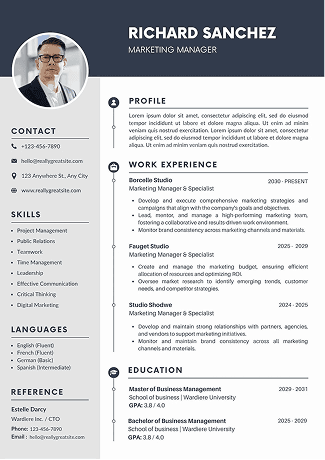
A free CV creator online is a web-based tool that lets you build, customise, and download a professional CV without installing any software. Unlike a blank document, an online CV builder comes pre-loaded with structured templates, suggested content, and formatting rules that mirror what hiring managers actually want to see.
The best online CV builder free platforms combine drag-and-drop simplicity with smart features like keyword suggestions, real-time previews, and ATS (Applicant Tracking System) compatibility checks. The result is a document that looks like it was crafted by a professional designer even if you have zero design experience.
Also Read : Teacher Interview Questions and Answers: Best Guide to Get Hired
How Is It Different from a Word Template?
Microsoft Word templates give you a static layout. A CV generator online is dynamic it adjusts spacing automatically, warns you when sections are incomplete, and often integrates AI suggestions to strengthen your bullet points. You can switch between multiple designs in one click rather than reformatting an entire document from scratch.
Why Use a Free Online CV Builder in 2026?
The job market has never been more competitive. Recruiters receive hundreds of applications per role, which means your professional CV builder choice can make a tangible difference in your job search outcomes. Here is why candidates increasingly prefer an online approach:
→ Speed: Most platforms let you create a CV online in minutes by populating guided fields rather than writing from scratch.
→ Professional design: Templates are crafted by HR professionals and graphic designers, ensuring the layout is both visually appealing and functionally correct.
→ ATS friendliness: Online builders structure your data in a way that parses cleanly through automated screening tools.
→ Easy updates: Need to tailor your CV for a specific role? Change a few lines and re-export — no reformatting required.
→ Multiple formats: Download as PDF, Word, or even a shareable link, depending on what each employer requests.
→ Zero cost: A quality-free resume maker removes financial barriers, meaning even job-seekers on tight budgets can access professional-grade tools.
Also Read : 10+ Free Canva Resume Templates (2026 Guide)
Who Benefits Most?
While anyone can benefit from a CV creator, certain groups find online tools especially transformative: recent graduates who have never written a CV before, career changers who need to reframe their experience, freelancers who juggle multiple skill sets, and professionals re-entering the workforce after a break.
Key Features to Look For in a CV Generator Online
Not every free CV creator online is built equally. Before committing to a platform, evaluate it against the following checklist.
Template Variety and Quality
Look for a CV generator online that offers templates across different styles — chronological, functional, and combination — as well as industry-specific designs for sectors such as finance, creative arts, healthcare, and technology. A template that suits a graphic designer will look out of place for a bank analyst.
ATS Optimisation
Choose a professional CV builder that specifically flags ATS compatibility. The safest layouts use standard section headings like "Work Experience," "Education," and "Skills," avoid tables and text boxes (which confuse parsing algorithms), and use common fonts such as Georgia or Garamond.
Guided Content Suggestions
The best free resume maker platforms offer pre-written bullet point suggestions based on job titles. Instead of staring at a blank field, you choose from proven phrases and customise them, a genuine time-saver when you create a CV online in minutes.
Real-Time Preview and Export Options
You should be able to see precisely how your finished CV will look as you type. Equally important is export flexibility: PDF is the standard for most applications, but some employers still request Word (.docx) files.
Also Read : Biodata vs Resume: Key Differences, Examples & When to Use Each
Comparison: Free CV Creator vs. Alternatives
How to Create a CV Online in Minutes: A Step-by-Step Guide
Ready to build your CV? Follow this streamlined process using any reputable free CV creator online.
1. Choose your template. Start with your target industry in mind. A chronological template suits most roles; a functional template works better if you are changing careers or have employment gaps.
2. Fill in your contact details. Include your full name, professional email, phone number, LinkedIn URL, and city. You do not need to include your full home address — city and country are sufficient.
3. Write a compelling personal statement. This is a 3–4 sentence summary at the top of your CV. Lead with your years of experience, key area of expertise, and the value you bring.
4. List your work experience in reverse chronological order. For each role, include your job title, company name, dates, and 3–5 achievement-focused bullet points beginning with strong action verbs (delivered, managed, grew, reduced, launched).
5. Add your education and qualifications. Include institution, qualification title, and graduation year. For experienced professionals, this section can be brief.
6. Build a skills section. List 8–12 hard and soft skills relevant to your target role. Many online CV builder free platforms let you add skill bars or tag-style chips here.
7. Run the ATS check. If your chosen CV generator online offers this feature, use it before exporting.
8. Export and save. Download as PDF for most applications. Save a Word version as a backup for employers who request editable files.
Also Read : Why Do You Want to Join Our Company? Best Answer Guide for Interviews
Writing Tips to Make Your Free Resume Maker Output Stand Out
The template does the design work; the writing is still down to you. These evidence-based tips will turn a good CV into a great one, regardless of which professional CV builder you use.
Quantify Your Achievements
Numbers stand out on a page and give recruiters concrete proof of your impact. Instead of writing “responsible for sales targets,” write “exceeded quarterly sales targets by 22% for three consecutive quarters, generating an additional £180,000 in revenue.” Every role has measurable outcomes — dig for them.
Tailor for Each Application
Using a free CV creator online makes it fast to maintain multiple tailored versions of your CV. Mirror the language from the job description in your personal statement and bullet points. If the advert says “stakeholder management,” your CV should use that exact phrase — it helps both the ATS and the human reader.
Keep It to One or Two Pages
For most roles, one page is ideal if you have under ten years of experience; two pages are acceptable for senior professionals. A good CV generator online will alert you when your content is pushing an awkward page break. Ruthlessly cut anything that is not relevant to the target role.
Use White Space Strategically
Dense, wall-to-wall text is exhausting to scan. The templates inside most online CV builder free platforms already handle this well, using generous line spacing, clear section dividers, and balanced margins. Resist the urge to shrink margins to cram in more content.
Also Read : Python Interview Questions and Answers (Complete Guide for Beginners & Experts)
Conclusion
Landing your next role starts with a CV that earns its 7-second window. A free CV creator online gives you the structure, design, and smart features needed to produce exactly that without spending a penny or waiting for a designer. The key takeaways from this guide:
→ Use an online CV builder free to get a professionally designed, ATS-optimised document quickly.
→ Choose templates suited to your industry and target role.
→ Quantify your achievements and tailor your CV for every application.
→ Run an ATS check before submitting — small formatting issues can be invisible to the eye but fatal to automated screening.
→ Keep your CV updated and saved in both PDF and Word formats.
The barrier to a great CV has never been lower. Open a professional CV builder today, follow the steps in this guide, and take the guesswork out of your job search one polished page at a time.
FAQs
Frequently asked questions about this topic
Related Blogs
Explore more insights and guides you might like.
CV vs Resume vs Biodata – The Complete Difference Guide
Learn the key differences between a CV, resume, and biodata and discover which one to use for your next job application.
Resume for Internship: How to Make a CV That Gets You Hired
Learn how to make a CV for an internship with this easy step-by-step guide. Perfect for freshers looking to create a strong first impression.
CV Font Style: CV Guide with Templates (2026) | Best Font Style for Resume
Choose the best CV font style for 2026. Improve readability, ATS compatibility, and create a professional resume that stands out instantly.
Languages Known in CV: CV Guide with Templates & Examples (2026)
Learn how to list Languages Known in your CV the right way in 2026. This guide covers proficiency levels, examples, and ready-to-use templates to help you present your language skills professionally and make your CV stand out.
How to Write an ATS Friendly Resume That Gets Interviews
Write an ATS friendly resume using the right format, keywords, and structure to pass applicant tracking systems and land more interviews.
What Is a Hybrid CV? Format, Benefits & Writing Tips (Complete Guide)
A hybrid CV combines skills and work history, helping professionals showcase strengths clearly while remaining ATS-friendly and appealing to recruiters.